
Improvements to the platform API
If your team builds integrations or automations on top of Security Center, this release offers greater flexibility.
- Flexible sorting across list endpoints
You can now control how results are ordered across a wide range of API endpoints - including assets, vulnerabilities, scans, schedules, tags, and more. The ordering parameter supports ascending and descending sort on multiple fields, making it easier to retrieve data in the structure your workflows require without additional processing on your side. - Open ports now included in network asset responses
Network asset endpoints now return discovered open ports directly in the response, including protocol and port number. This gives integrations immediate access to port-level visibility without requiring a separate lookup, streamlining asset inventory and exposure analysis workflows. - New filtering capabilities
Scans can now be filtered by start and finish date, and vulnerabilities by first and last detected date - across both network and web endpoints. This makes it significantly easier to query for specific time windows. - Authentication status on asset endpoints
Asset endpoints now include the authentication status of the most recent scan, giving you direct visibility into whether authenticated scanning succeeded or failed for a given asset. This helps teams identify configuration issues and ensures you can trust the depth of your scan results.
Additional API improvements
The severity field on Device Agent responses has been updated from a simple string to a structured object with a breakdown by severity level. Moreover, default ordering for scan profiles now returns the newest first.
The API documentation has been updated with this release.
Remediation tickets now visible in asset & vulnerability lists
Remediation tickets are now visible directly in the ‘All assets’ views list, giving you immediate visibility into which items already have actions in progress - without leaving the view you’re working in. You can also filter assets by whether a ticket has been created, making it straightforward to identify gaps in remediation coverage - surfacing vulnerabilities that haven’t been assigned a ticket yet, or focusing on items already being tracked.
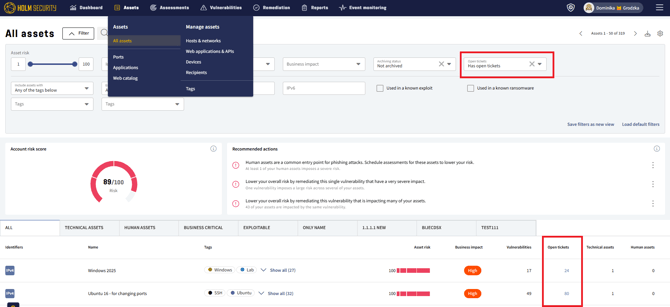
The result is a single view where you can assess your vulnerability landscape, easily review remediation status, and act on what’s missing. When you need more detail, a single click takes you straight to the remediation (tickets) view.
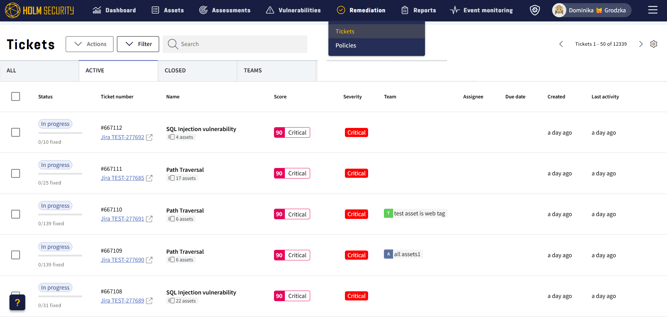
The win? Less context-switching, faster decision-making, and a clearer picture of where your team’s efforts are focused. The same enhancement will be coming to the ‘All vulnerabilities’ view.
Patch-level visibility for scanned hosts
Scanned hosts now surface more granular versioning detail, including the specific patch level of the operating system - available when authenticated scanning is enabled. This goes beyond standard OS identification by exposing the exact revision - helping you determine not just which OS version a host is running, but precisely how up to date it is.
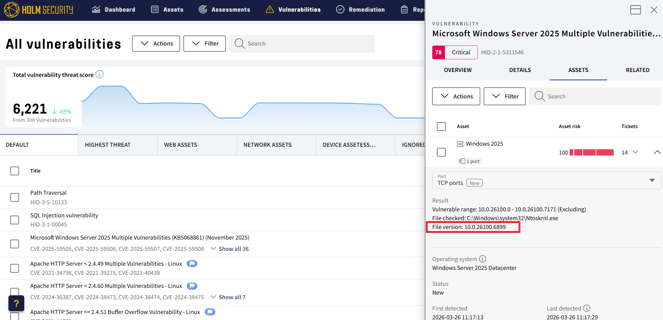
For authenticated Windows hosts, the full build detail is now displayed in Microsoft’s standard format - for example:
Windows Server 2025 Datacenter (24H2, Build 26100.6899)
The revision number ‘6899’ reflects the exact patch level applied, making it straightforward to identify hosts that are running the correct OS version but are behind on critical patches.
This added granularity supports more informed patching decisions, helps identify remediation gaps that version-level data alone would miss, and strengthens your ability to demonstrate patch compliance across your environment.
Please note
Patch-level information is only available when running authenticated scanning.
Read more about authenticated scanning here.
Additional enhancements
-
Tickets can now be created correctly from the filtered view within 'All vulnerabilities.
-
The domain list in Domain Asset Discovery has been optimized for improved performance.