
Secure your Microsoft 365 environment, now included
Earlier this year we launched Active Directory Security. Microsoft 365 Security now joins it, completing the picture: Active Directory covers who gets access to your environment, and Microsoft 365 covers where they go once they're in. Together, Active Directory Security and Microsoft 365 Security give you full visibility into identity and cloud risk - in one platform.
Security Center now continuously assesses your Microsoft 365 tenant against the CISA Secure Cloud Business Applications (SCuBA) baseline - a federal security standard, not a vendor recommendation. It runs over 100 checks across Microsoft Entra ID, Exchange Online, Microsoft Teams, Microsoft Defender for Office 365, and SharePoint Online, surfacing results in Security Center alongside your existing network, web, and cloud findings.
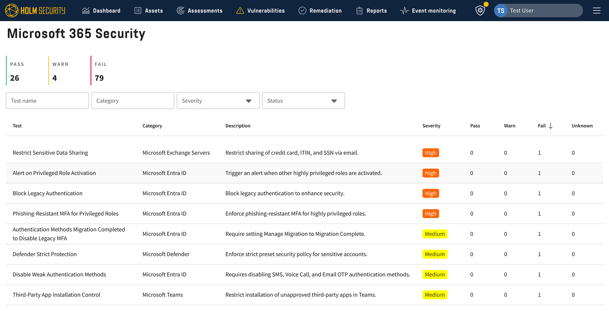
Checks span identity and access, email security, collaboration, and data protection. Each check returns a pass or fail with the specific users, groups, or settings affected, and a remediation path linked to the relevant Microsoft admin center. Access is read-only, enforced through Microsoft's Global Reader role, so the assessment cannot make changes to your tenant.
Once enabled, Microsoft 365 Security monitors continuously, detecting configuration drift as administrators make changes or Microsoft introduces new features with insecure defaults, and adds new checks over time as the CISA SCuBA baseline evolves.
Included at no extra cost
Microsoft 365 Security is included in your System & Network Security and Cloud Security subscriptions at no additional cost.
Availability:
- Microsoft 365 Security is only available using cloud deployment.
Read how to get started here:
How do I get started assessing my Microsoft 365 environment?
Read more about what our platform checks in our blog:
Inside a Microsoft 365 security assessment: What gets checked & what Secure Score misses.
Comments now in “All vulnerabilities” view
You can now comment on vulnerabilities directly in the All vulnerabilities view. A comment added on the vulnerability applies to every asset it affects, which makes it a good fit for sharing remediation guidance with everyone working on the fix, or for recording a decision, such as accepting a risk, so the reasoning lives in one place.
To comment on just one asset, open the vulnerability, go to its Assets section, and open the specific detection. A comment added there applies to that asset only, which works well for noting an exception, tracking a fix that only applies to that asset, or flagging who owns it.
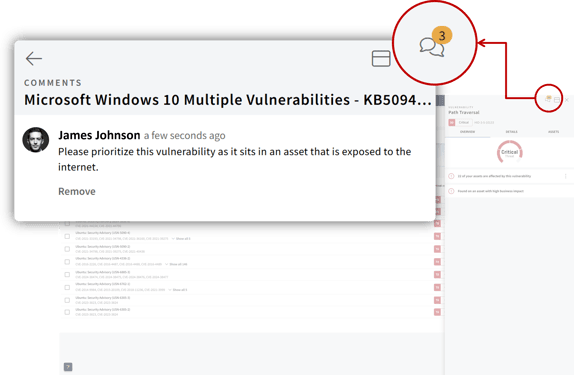
Comments stay attached to the vulnerability in Security Center. Security and IT teams can follow the same thread, and fewer conversations end up in email or chat.
Important information
Comments are moving to "All vulnerabilities". From now on, you add comments in the "All vulnerabilities" view. Your existing comments in "Network & web", the legacy vulnerability management view, will be copied to "All vulnerabilities". Nothing is deleted. You can still read your comments in the legacy view, but you can no longer add new ones there. The legacy view now includes a link that takes you to "All vulnerabilities".
Read more about how to add comments in our article:
How do I add comments?
Ready-made Active Directory scan profiles
Two ready-made scan profiles are now available for network scanning of Active Directory.
- Active Directory scan – Standard
- Active Directory scan - Extended
The profile "Active Directory scan – Standard" identifies misconfigurations, such as your domain's master key has not been rotated. The profile "Active Directory scan – Extended" identifies misconfigurations and performs all standard network scan vulnerability tests as well.
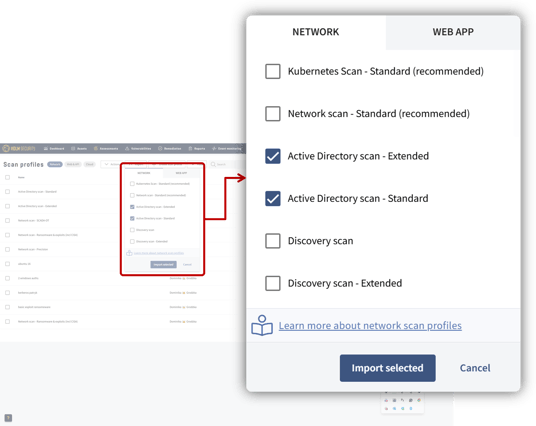
Important note: Authenticated scanning is required to find vulnerabilities in your Active Directory.
Tip: More complete coverage with Cloud Security
Combining Cloud Security with System & Network Security allows you to find vulnerabilities in hybrid environments that use Active Directory and Entra ID.
Read more about Active Directory Security in our blog.
Read more about scanning Active Directory:
How do I scan Active Directory?
4th generation Scanner Appliance
We are releasing a new version of the Scanner Appliance. It runs on a fully supported operating system, adds Kerberos authentication, and is required for policy scans going forward.
We will continue to support the previous version for now. However, we strongly recommend that you upgrade.
What's new
-
Built on Debian 13: The previous appliance runs on Debian 11, which has reached end of life. The new appliance runs on Debian 13. That means current security patches and a long support window.
-
Kerberos authentication for authenticated scans: You can now use Kerberos for authenticated scans. SNMP support will follow in a later release.
-
Required for policy scans: Policy scans will soon only be supported on the new Scanner Appliance.
-
Simpler and more stable: We rebuilt the appliance on a leaner internal architecture. This includes many stability and performance fixes. You will not see most of them directly, but scanning should be more reliable day to day.
-
Change to registration: We have updated the registration process. You now register a Scanner Appliance with an enrollment code instead of a token.
Important: New installation required
A reinstallation is required to upgrade to the new Scanner Appliance. We recommend upgrading your scanners to avoid missing out on improvements in this version and future updates.
For more information, read:
How do I upgrade the Scanner Appliance?
You can also read about how to monitor a Scanner Appliance with SNMP here:
How do I monitor a Scanner Appliance with SNMP?
Kerberos authentication available
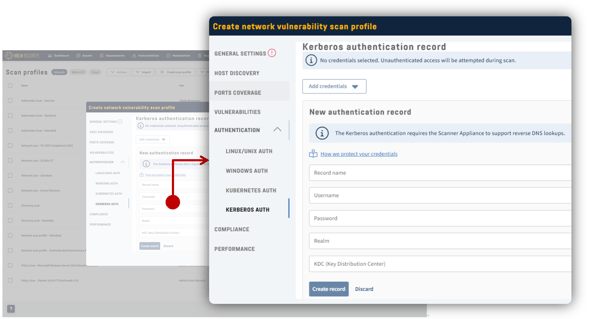
You can now authenticate when performing a network scan using the Kerberos authentication protocol, both using our cloud scanners and your own Scanner Appliance. Simply provide username, realm, KDC (Key Distribution Center), and password. The authentication record is found together with other supported authentication records in your scan profile.
Deployment
Scanner Appliances
Kerberos requires the 4th generation Scanner Appliance to be installed. When the scanner is installed, the feature will be available automatically.
Cloud scanners
Our cloud scanners (external scanners) will be upgraded on a rolling basis to avoid customers returning failed scans. We expect this process to take approximately a week.
On-prem deployment
Kerberos will be available after the next update, later in 2026, which will also require a Scanner Appliance update to work.
Read more in our Kerberos article:
How do I scan using Kerberos authentication protocol?
Additional enhancements
- Cloud assessment authentication status: Cloud assessments now show the status, clarifying what went wrong if authentication or permissions failed.
- Web scan duplicate threshold control: You can now configure the sensitivity for which web pages are considered duplicates and will not be scanned, to reduce scan time. For more information, read How do I avoid scanning duplicate web pages?
- CIS Benchmarks now support Red Hat version 10: CIS Benchmarks (policy scanning) now supports Red Hat version 10.
- Dashboard performance improvements: The dashboard has received general performance improvements including the ability to resize widgets.
- Corrected scan profile: The scan profile “Network scan - Ransomware & exploits (including CISA)” now correctly focuses on discovering vulnerabilities that are related to ransomware and exploits.
- Self-hosted Jira: You can now connect Holm Security to a self-hosted Jira Server.