
Introducing a modern menu for streamlined navigation
We’re excited to roll out a redesigned main menu built to support a smoother, more intuitive workflow throughout Security Center. Instead of navigating through multiple views or tracking down features, you can now move through your daily tasks with fewer clicks and far less context‑switching.
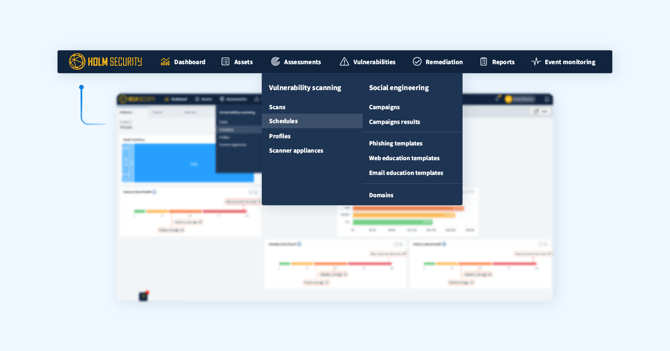
The streamlined experience brings related capabilities together, helping you stay focused on the work - not the navigation:
- A unified view of your environment
“Unified assets” and “Unified vulnerabilities” now live directly under “All assets” and “All vulnerabilities,” respectively, giving you a clearer, consolidated starting point for assessing your security posture.
- Faster access to training tools
Phishing Simulation & Awareness Training features are now available directly from the main menu, eliminating the need to switch back and forth between main views.
- All scans in one place
Every scan type is now grouped under “Assessments,” making it easier to find and manage assessments.
- Administrative items right where you need them
User management, settings, and all configuration options have been brought together in the right‑side menu for quick, convenient access.
This new navigation experience is designed to make Security Center feel more connected, more consistent, and more efficient - whether you’re handling daily operations or managing administrative tasks.
High‑efficiency web and API scans
Web and API scans can now run faster and more efficiently by reusing an asset’s existing sitemap. Instead of redundant crawling, scans can immediately focus on the areas most likely to contain vulnerabilities - saving time and improving overall efficiency.
- Shorter scan times
Reusing a sitemap eliminates redundant crawling, allowing scans to complete more quickly without sacrificing depth or accuracy.
- Greater efficiency at scale
Large or frequently scanned targets benefit from more efficient scanning and optimized performance.
- More accurate targeting
Updated sitemaps from discovery scans ensure vulnerability scans always start with the latest view of your application.
- Easy to adopt
Sitemap reuse can be enabled directly when configuring a new scan.
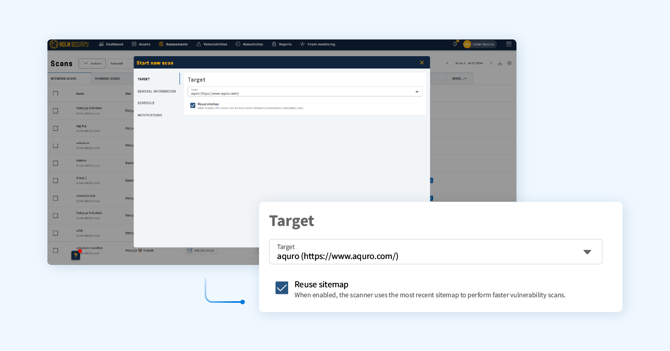
This enhancement will be available on Scanner Appliances starting with revision 3.20.0, rolling out in the coming weeks.
Improved ticket notifications & integration context
We’ve strengthened notifications and integrations to help teams act with greater clarity and context. Email alerts can now be sent directly to the asset owner through teams, ensuring that the right person is looped in the moment a vulnerability needs attention. This creates a more responsive, streamlined workflow where action isn’t delayed by manual routing.
To further improve context downstream, a new integration placeholder, {vuln.detection_result}, is now available for Webhooks, Jira, and TOPdesk, among others. By including detection details directly in tickets and notifications, teams gain immediate insight into what was found and why it matters.
Latest CIS Benchmark policies now available
Support for the newest CIS Benchmarks is now live, giving you immediate access to the most current security guidance for your environments. With updated CIS Benchmark policies for Microsoft Windows Server 2025, Debian Linux 12, and Oracle Linux 9, among others, you can evaluate your systems against today’s standards rather than last year’s guidance.
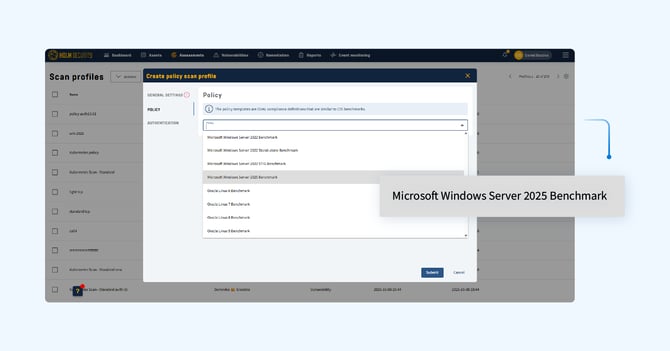
By keeping your assessments aligned with the latest CIS Benchmarks, you maintain a stronger, more accurate view of your compliance posture and reduce the risk of drifting away from industry‑recognized best practices.
Additional enhancements
- Fixed an issue where some CIS Benchmarks scans failed due to timeouts.
- Authentication‑related scan errors now display the relevant HIDs for easier troubleshooting.
- TCP port 6379 is now included as a standard port in network scans.
- Resolved an issue where incomplete Windows updates could cause incorrect installation dates using the Device Agent.
- SAML single sign‑on now supports session timeouts of up to two weeks, similar to the “Remember me” option for non‑SSO logins.
- Grouped tickets created from the vulnerabilities overview now bundle all selected vulnerabilities into a single ticket.