How to scan or identify vulnerable Java applications
Holm Security has released vulnerability tests for CVE-2026-114938. You can find instructions on how to scan for this vulnerability and/or identify vulnerable Java applications here: Read more
Java SE and OpenJDK, the runtime and development kit behind enterprise applications such as Jira, Confluence, and Keycloak, contain a heap overflow vulnerability in the Base64 decoding intrinsic that gives cybercriminals full control of a system without logging in. They can reach it through any service that Base64 decodes attacker input, including web services, authentication headers, and tokens.
CVE-2026-114938, dubbed Java4Shell, carries an 8.1 out of 10 (High) CVSS 3.1 score from Oracle, and Calif rates it 9.2 (Critical) under CVSS 4.0. Public PoCs exist, but there’s no confirmed exploitation in the wild, and CISA hasn’t added the vulnerability to its KEV Catalog.
Read Oracle’s security alert (external link).
How the vulnerability works
The vulnerability sits in the intrinsic that Java uses to speed up Base64 decoding on x86-64 systems with AVX-512. The intrinsic is enabled by default. When it processes crafted input, it triggers a heap overflow.
Any service that Base64 decodes attacker-controlled input can be a way in. Cybercriminals don’t need an account or any user interaction. Oracle rates the attack complexity as high, because the vulnerable code path only runs on hardware with AVX-512. That hardware is common on modern servers, but not universal.
Vector:
CVSS:3.1/AV:N/AC:H/PR:N/UI:N/S:U/C:H/I:H/A:H
Why this is dangerous
Oracle rates the impact as full takeover, with high impact on confidentiality, integrity, and availability. Cybercriminals can exploit the vulnerability over the network without authentication or user interaction.
Public PoCs are available, but they don’t apply to every environment. Exploiting the vulnerability requires target-specific payloads.
Affected software
The vulnerability affects x86-64 systems with AVX-512 and the Base64 intrinsic enabled, which is the default.
Oracle Java SE:
- 8u511b33-perf
- 17.0.21.0.3
- 21.0.13.0.3
- 25.0.5.0.3
- 27.0.1.0.3
GraalVM for JDK:
- 17.0.21.0.3
- 21.0.13.0.3
GraalVM EE:
- 21.3.20.0.3
OpenJDK:
- 17
- 21
- 25
- 27
Mitigation & next steps
Oracle fixed the vulnerability in its CSPU in November 2026, released on November 17. Update your JDK to get the fix.
There’s also a workaround. Disable the Base64 intrinsic by setting this option:
- -XX:-UseBASE64Intrinsics
Holm Security's vulnerability tests
Holm Security has released the following vulnerability tests to scan for this vulnerability. These tests require authenticated scanning.
- HID-2-1-5413743
OpenJDK Base64 Decoder OOB Write Vulnerability (CVE-2026-114938, Java4Shell) - HID-2-1-5421379
Oracle Java SE Base64 Decoder OOB Write Vulnerability (CVE-2026-114938, Java4Shell) - Linux - HID-2-1-5421370
Java (Oracle Java SE / OpenJDK) Base64 Decoder OOB Write Vulnerability (CVE-2026-114938, Java4Shell) - Windows
Scan for Java4Shell
Follow these steps to set up a specific scan profile to identify this vulnerability. After you have created the profile, you create a network scan based on the profile.
- Log in to Security Center.
- In the main navigation bar, hover over Assessments.
- From the dropdown menu that appears, select Profiles.
- Click +Create scan profile > Network vulnerability.
- Under Authentication, create an authentication record for the target. Notice that authenticated scanning is required.
- Under Include in the input Vulnerability, select one of the HIDs listed above depending on your system.
- Once you have made your selection, click Submit.
- The profile is now ready to be used in your network scan.
- Done!
Find vulnerable Java applications
Follow these steps to understand which vulnerable Java applications are running in your environment.
- Login to Security Center.
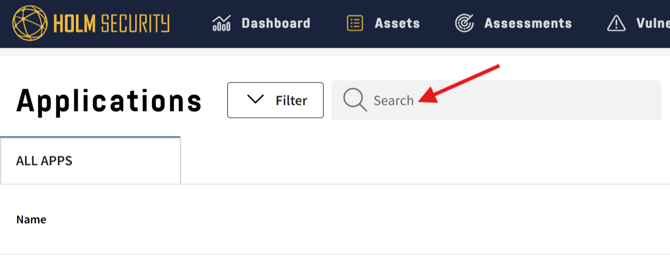
- Click Assets > Applications.
- Type “jdk” or "java" in the Search field.
- Open the vulnerability to see more information.