
Duplicated forms with the same ID can exist, making it impossible to authenticate against them.
By blacklisting with CSS selectors, it will eliminate elements that block the possibility of performing authentication properly.
To blacklist CSS selectors, follow these steps:
- Open your web application in a browser, i.e., Google Chrome.
- Right-click on the page and click Inspect.
- Then right-click on the focused element.
- Click Copy > Copy selector.

- Log in to your Security Center.
- In the main navigation bar, hover over Assets.
- From the dropdown menu that appears, select Web applications & APIs.
- Add a new web application asset or edit an existing one by clicking on the Edit icon to the right of the asset.
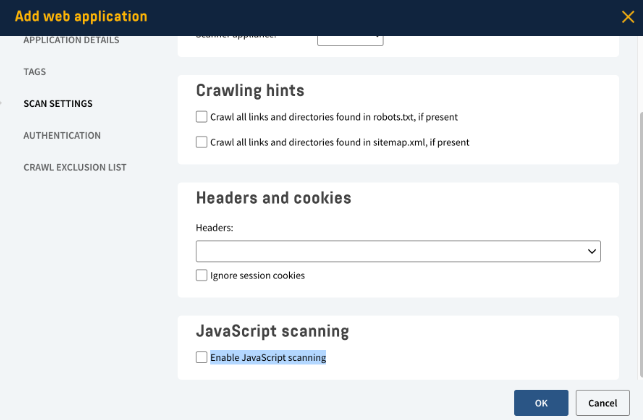
- Click Scan settings > Enable JavaScript scanning.
- Click Crawl exclusion list.
- Scroll down and enable CSS blacklist.
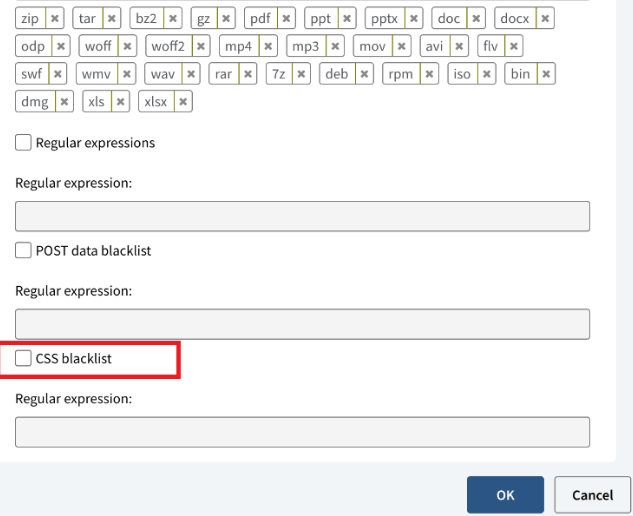
- Paste the selector in the CSS Selector field.
- Click OK.
This will help you remove an element from the target site.