
If you have configured authenticated web assessments and would like to check whether the authentication was successful, you can find this information in the assessment warning message. For more details, see the assessment report or the Vulnerabilities section for the informational HIDs in your Security Center.
Chromium Web Recorder plugin authentication
Additional Scan Info (HID 3-0-00002)
This HID will provide information about authentications performed via a pre-recorded sequence. If there are no errors, the autocomplete sequence will state that it authenticated successfully. If there are issues, each issue will be listed with the current actions that may be unsupported.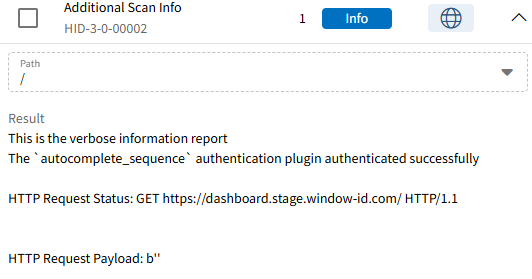
Form authentication
Authentication failure (HID-3-0-10116)
The information in this HID indicates the authentication result and whether the assessment was unable to log in. If this HID is not present, the login was successful. 
Find informational HIDs:
To view informational HIDs, make sure the "Info" severity is enabled in your filter settings. Once activated, informational HIDs will be visible in the assessment report or in the Vulnerabilities section in your Security Center, depending on where you activated the filter.