
The partner portal automatically scans company listed in the dashboard and generates tasks to help partners stay on top of important actions and alerts. Tasks are categorized by severity level (High, Medium, Low) and category (Commercial, Product Usage, Churn Risk).
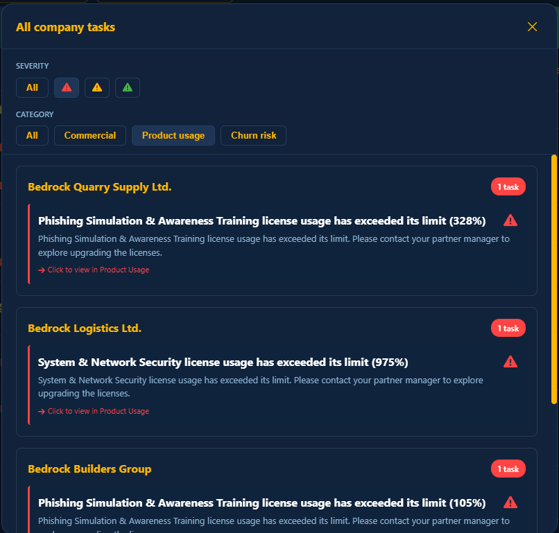
You can filter tasks by selecting the severity triangle and the desired category. To investigate what contributes to a specific task, simply click on any of the tasks listed above. This will navigate you to the corresponding company tab, where you can review details such as commercial information, product usage, and more.
Task categories
Tasks are generated under three main categories.
Commercial Tasks (Reseller only)
- Contract renewal notifications
Product Usage Tasks
- License capacity alerts (Reseller only)
- Inactive product detection (MSSP only)
Churn Risk Tasks
- Inactive scanner appliances
- Failed scan alerts
Task types
For each category above, a range of tasks is generated. Below, you’ll find a breakdown of task types, their generation criteria, and the assigned severity levels - along with the rationale behind each assignment.
1. Contract renewal tasks (Reseller)
Category
- Commercial
When Created
- 6 months before renewal → LOW severity
- 3 months before renewal → MEDIUM severity
- Less than 1 month → HIGH severity
Task Details
- Shows order number
- Displays end date
- Calculates days/months remaining
2. High license usage (Reseller)
Category
-
Product usage
When Created
- 60-79% usage → LOW severity
- 80-100% usage → MEDIUM severity
- Over 100% usage → HIGH severity
Task Details
- Shows product name
- Displays current usage percentage
- Suggests upgrade if approaching limit
3. Inactive product usage (MSSP)
Category
-
Product usage
When Created
- > 7 days inactive → LOW severity
- > 14 days inactive → MEDIUM severity
- > 30 days inactive → HIGH severity
Task Details
- Shows days since last usage
- Identifies which product is inactive
4. Inactive scanner appliances
Category
-
Churn risk
When Created
- One or more scanner appliances are offline/inactive → MEDIUM severity
Task Details
- Shows count of inactive scanners
- Displays total scanner count
5. System & Network Security failed scans
Category
-
Churn risk
When Created
- System & Network Security product has failed scans detected → HIGH severity
Task Details
- Shows number of failed scans
- Displays scan date
6. Web Applications Security failed scans
Category
-
Churn risk
When Created
- Web Applications Security product has failed scans detected → HIGH severity
Task Details
- Shows number of failed scans
- Displays scan date
7. Cloud Security failed scans
Category
-
Churn risk
When Created
- Cloud Security product has failed scans detected → HIGH severity
Task Details
- Shows number of failed scans
- Displays scan date