
A smarter way to view vulnerabilities found with Device Agent
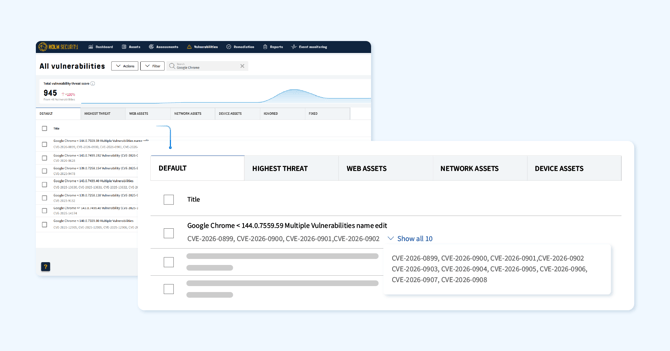
We’re rolling out a significant improvement to how we display vulnerabilities discovered using Device Agent. Instead of showing one vulnerability per application version and CVE, we’re grouping related CVEs into a single vulnerability based on the vendor advisory for the affected product.
This change is designed to give you a clearer, more actionable view of your vulnerabilities. Since it affects how vulnerabilities are structured, we’ve outlined what’s changed and how it may impact your environment below.
What’s changed?
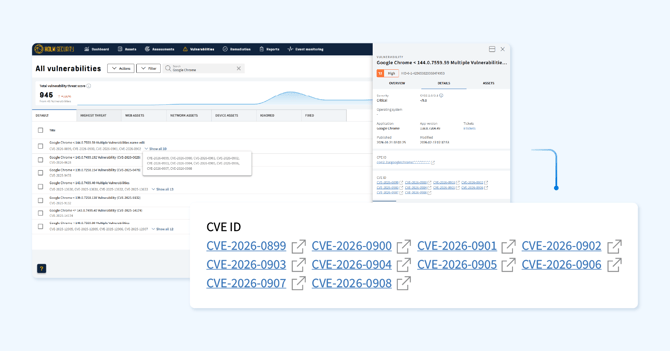
Each CVE for a specific application version has previously been shown as a separate vulnerability. We have now grouped CVEs that affect the same version range and share the same vendor advisory into a single vulnerability record. The highest severity across all included CVEs is applied to the group, and you'll see all impacted assets within each affected version range.
For example, if multiple CVEs affect Chrome versions 128.0.1 to 129.1.0, these will be consolidated into one grouped vulnerability.
How this impacts your environment
Because we’ve restructured vulnerabilities, you may notice changes across several areas of Security Center. Notice that this concerns vulnerabilities discovered using a Device Agent.
- Vulnerability counts will likely decrease
Grouping related CVEs into a single record means fewer individual vulnerabilities, even though the same coverage is maintained. - Severity levels may increase for some vulnerabilities
Since we apply the highest severity across all grouped CVEs, some grouped vulnerabilities may carry a higher severity than the individual records they replace. - Threat scores and risk scores may shift
The changes in severity and vulnerability count can affect both asset-level and account-level risk scores. - Dashboard widgets will reflect the new data
This change will impact widgets displaying vulnerabilities. Annotations will be visible in affected widgets to help explain any changes in the data. - Reports including vulnerabilities found using a Device Agent
Reports that include vulnerabilities will reflect the updated count when they are newly created. - Remediation tickets impact
Tickets that are linked to vulnerabilities could disappear if the vulnerabilities are grouped and tickets that are integrated to external systems might also get disconnected. However, if a scan re-runs against the same target and the vulnerability is still there with a ticket policy, this will generate new tickets. - Active “Ignored” status will carry over
An existing “Ignored” status will automatically map to the corresponding new grouped vulnerabilities, so you don’t need to reconfigure them.
Do I have to take any action?
No action is required, as this update applies automatically to all accounts using Device Agents. However, we recommend reviewing your dashboards, reports, and remediation policies that include vulnerabilities discovered using a Device Agent to familiarize yourself with the updated view.
We will be rolling out this improvement across all accounts in the coming weeks. If you have questions about these changes, please contact your dedicated Customer Success Manager or Support.
Simpler policy scan setup for CIS Benchmarks
Setting up policy scans for CIS Benchmarks just became much easier. You can now configure scans without requiring HTTPS, removing the need for extra setup steps on your target assets before getting started.
Previously, getting policy scans running often meant additional configuration on the target side to meet connectivity and authentication requirements. That overhead is now gone - you can go straight to scanning without it slowing you down.
The result is a faster, more streamlined path to assessing your systems against your security policies, with fewer barriers between you and the visibility you need.
Read more about this simpler setup
Scan by hostname - a smarter way to target your network assets
You can now configure system and network scans using hostnames instead of IP addresses, giving you greater flexibility in how you target and manage your assets.
This is especially useful in environments where IP addresses change frequently or where hostname-based targeting better reflects how your infrastructure is organized. Instead of tracking shifting IPs, you can scan against a stable, meaningful identifier.
To support this, network assets now display all discovered hostnames, and you can choose which one should serve as the primary - helping keep your asset inventory organized and ensuring scans consistently hit the intended target.
- Hostname-based scanning
Optionally select hostname as the scan target instead of IP, for more reliable and flexible coverage.
What’s coming next? The following features will be included in the next product release:
- Full hostname visibility
All hostnames discovered for a network asset are now surfaced, giving you a complete view of how each asset is identified across your environment. - Primary hostname selection
Choose which hostname takes precedence, keeping asset records clean and consistent.
We’re rolling this out to all accounts over the next few days.
Read how to scan a network target using hostnames
New and improved Scanner Appliance
Latest web scan engine now available on Scanner Appliance
The newest web scan engine is now available directly on the Scanner Appliance, including the sitemap feature introduced earlier this year. Web scans can now reuse an asset’s existing sitemap instead of re‑crawling from scratch, allowing scans to begin immediately with the areas most likely to contain vulnerabilities.
Read how to scan with previous crawling history
Hardware status health in the console setup interface
Unmet hardware requirements are now highlighted in the System Status view in the Scanner Appliance Config UI. Instead of digging through logs or waiting for unexpected scan behavior to reveal a problem, you'll get an immediate, visual signal directly in the console - making it faster to spot and resolve configuration issues before they affect your scans.
Improved compatibility for custom CA certificates
The Scanner Appliance now accepts customer-supplied CA certificates, expanding support for organizations that operate within custom certificate environments. This removes a common friction point for teams managing internal PKI infrastructure, ensuring smooth integration with your existing security setup without the need for workarounds.
Additional enhancements
- The vulnerability count displayed on the Device Assets page now excludes informational findings, giving you a clearer and more accurate view of your actual risk exposure.
- We’ve resolved an issue on the Phishing Simulation & Awareness Training templates page where the domain filter was not working as expected.
- Timestamp accuracy for vulnerabilities found using Device Agent has been improved, resolving potential discrepancies in “Last detected” reporting.