
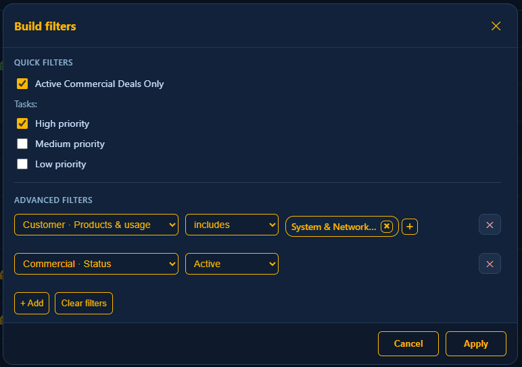
With the table filter builder, you can customize which filters are applied to the dashboard table. All selected filters use an AND logic, meaning each filter you apply will be combined with any others, so only records matching all criteria will be displayed.
Quick filters
In the quick filters section you are able to apply filters to the table by just selecting them
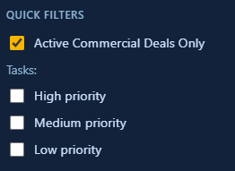
- Active Commercial Deals Only (Reseller partnership): Displays only commercial deals with an Active status.
- Active Subscriptions Only (MSSP partnership): Displays customers who currently have an active Security Center subscription.
- Tasks: Filter tasks by priority - High, Medium, or Low. If no priorities are selected, all companies with any task priority will be included.
Advanced filters
In the advanced filters section, you can click the +Add button to apply multiple filters across all visible table columns. For guidance on customizing your table layout and selecting which columns to display and filter, please consult the Column management Knowledge Base article.
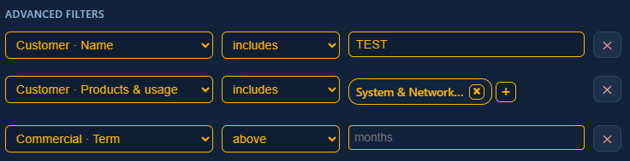
Below is the full list of available filters:
- Customer – Name: Specify whether to include, exclude, or match specific customer names.
- Customer – Tags: Choose to include, exclude, match, or select customers with or without specific tags. The available tags correspond to filters currently assigned to customers.
- Customer – Products & Usage: Filter by customers with specific product usage - include, exclude, match, or select those with no products.
- Commercial – Status: Filter to show only Active or Inactive subscriptions.
- Commercial – Order #: Include, exclude, or match a specific order number.
- Commercial – ACV: Filter based on Annual Contract Value (ACV) - set thresholds above or below a certain value, specify an exact value, or select empty values.
- Commercial – Auto Renewal: Include subscriptions with or without auto-renewal.
- Commercial – Start Date: Filter for start dates above or below a specific date, match exact dates, or include empty values.
- Commercial – End Date: Filter for end dates above or below a specific date, match exact dates, or include empty values.
- Commercial – Term: Filter by subscription term - set ranges above or below a specific number of months, specify exact durations, or include empty values.
- Commercial – Invoicing Account: Include, exclude, or match the name of an invoicing account.
- Security Center (Cloud) – Status: Include, exclude, or match a Security Center status. For a comprehensive list of possible values, refer to the Dashboard article in the Knowledge Base.
- Security Center (Cloud) – ID: Include, exclude, or match a specific Security Center ID.
- Security Center (Cloud) – Name: Include, exclude, or match the name of a Security Center.